
How Playtest Notes Shape Iteration Progress
Playtesting is essential for game development, but the real value lies in the notes you take during the process. These notes turn vague player reactions into actionable insights, helping you refine your game. Here's why they matter and how to use them effectively:
- Detailed notes help identify root problems, not just symptoms.
- Real-time documentation prevents losing critical context.
- Tracking player actions and emotions provides a fuller understanding of issues.
- Open-ended questions gather honest, useful feedback.
- Version control ensures changes are tracked and evaluated systematically.
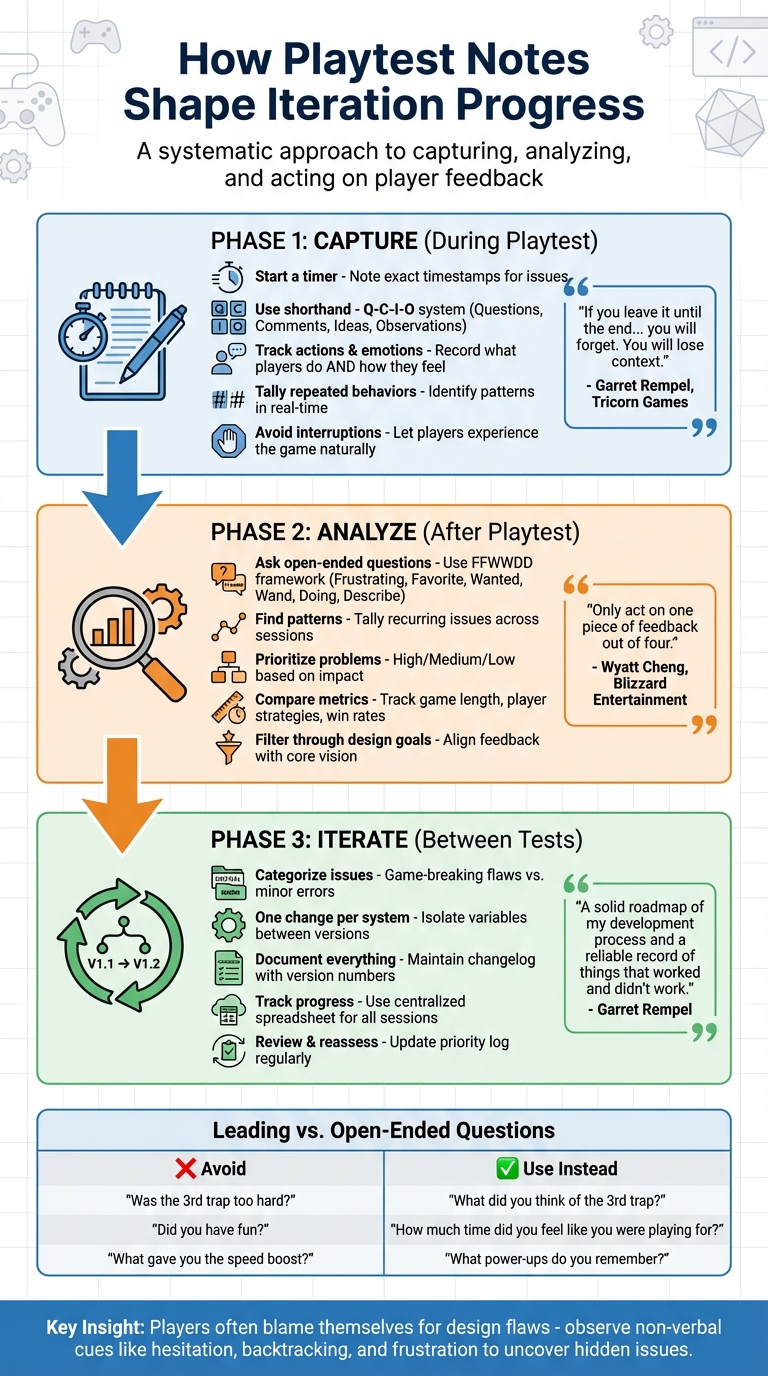
Effective Playtest Note-Taking Process for Game Developers
Common Problems in Playtest Documentation
Vague or Incomplete Feedback
Capturing playtest events in real time is crucial to avoid losing important details. If you rely on memory instead of documenting issues as they happen, you might forget the exact moments players struggled, the questions they asked, or the context that highlighted a problem. Garret Rempel, Founder of Tricorn Games, emphasizes this point:
"If you leave it until the end, or only take notes on the post-game comments... you will forget. You will lose context, you will forget some of the important things that happened."
Feedback like "the game felt confusing" or "it was too hard" lacks the specificity needed to identify the root of a problem. These generic comments don't clarify whether the confusion stems from unclear rules, flawed design, or missing instructions. Steve Bromley, a User Researcher, explains that internal playtests often result in feedback that is "vague, and unhelpful - quickly becoming little more than bug reports". Without organized and detailed notes, it becomes harder to pinpoint what needs improvement, slowing the iteration process.
Additionally, dismissing non-verbal cues can lead to an incomplete understanding of the player experience. Observations like body language, hesitation, or repeated actions often reveal problems that verbal feedback alone cannot.
Missing Emotional and Behavioral Cues
Incomplete notes don’t just miss critical actions - they often fail to capture emotional responses. Players rarely share the full extent of their frustration or confusion. Jozef Kulik, a Games User Researcher at Player Research, highlights this behavior:
"You've just watched them struggle to drive a car in a straight line for 45 minutes... and yet the player will tell you that everything was fine. ...the player [doesn't] recognise this as the type of thing you want them to talk about."
This happens because players often internalize design flaws, blaming themselves instead of the game. If your notes focus only on what players say, you might miss subtle cues like hesitation, backtracking, or moments of visible frustration. For example, John Hopson, a User Research Lead, developed real-time feedback systems for games like Halo 2 and Destiny 1 to capture these hidden emotional states. During Destiny 1's development (2014–2016), his team created "button boxes" using scavenged Xbox 360 controller circuit boards and arcade buttons. These allowed players to log feelings like "Hard" or "Fun" without disrupting gameplay.
Ignoring non-verbal signals can mask deeper design flaws, much like generic feedback hides systemic issues. Observing how players interact with the game, alongside their emotional responses, provides a fuller picture of what needs fixing.
sbb-itb-7b84150
How to Capture Useful Playtest Notes
Focus on Player Actions and Reactions
Tracking what players do and how they react provides a clear picture of how your game is performing. Start a timer at the beginning of the session and note the exact times when issues or reactions occur. This makes it much easier to review video footage later. When a player struggles, record the details: did they achieve the objective, how long did it take, and did they need a hint?.
To streamline your note-taking, create a shorthand system. For example, use "Q-C-I-O" to stand for Questions, Comments, Ideas, and Observations, and include symbols to mark emotional cues like confusion or frustration.
Keep a tally of repeated behaviors - this helps you quickly identify major issues. Tools like mind maps and player ID tags can also help you spot patterns in real time. These detailed notes will prepare you to ask targeted, meaningful follow-up questions.
Ask Specific, Open-Ended Questions
The quality of your post-playtest questions determines whether you get useful insights or just polite feedback. Shawn Patton, Senior Designer at Schell Games, suggests using the FFWWDD framework: ask about Frustrating moments, Favorite moments, what they Wanted to do, their magic Wand change, what they were Doing, and how they would Describe the game. This approach encourages honest, unfiltered feedback without steering the player toward specific answers.
Avoid leading questions that hint at the response you’re looking for. Instead of asking, "Was that puzzle hard?" try, "What did you think of that puzzle?" to get a more neutral perspective. If a player hints that something might be tricky for others, redirect with, "How was that part for you?" to focus on their personal experience.
Here’s a quick comparison of leading versus open-ended questions:
| Leading/Biased Question | Open-Ended Alternative | Goal of the Question |
|---|---|---|
| "Was the 3rd trap too hard?" | "What did you think of the 3rd trap?" | Neutral assessment of difficulty |
| "Did you have fun?" | "How much time did you feel like you were playing for?" | Measuring engagement/flow |
| "What gave you the speed boost?" | "What power-ups do you remember? What did they do?" | Testing recall and clarity |
Avoid Interrupting the Playtest Flow
Interruptions can skew your results. Alexander Brazie, a Game Designer at Game Design Skills, explains that the goal is "not to prove to the playtesters you've made a fun game. It's to observe what people do when they first encounter your video game". Provide players with written instructions on basic controls before they start, so they can refer to them without breaking immersion.
A second note-taker can help maintain the natural flow of the session. While the moderator focuses on the player, the second observer can take detailed notes from a separate room. This setup also reduces the pressure players might feel to "perform" for the designer. If you need to step in - whether to fix a bug or clarify a rule - keep it brief so the player can quickly return to their natural state of play. Encouraging players to "think aloud" as they play can also provide insights into their decision-making process without requiring constant interruptions.
Finally, assign a version number to each build and link every playtest log to that specific version. This makes it easier to track progress and see which changes addressed specific problems.
Turning Playtest Notes into Iteration Insights
Finding Patterns and Problem Areas
Once you've gathered your playtest notes, the next step is to make sense of them. Start by identifying recurring issues - this could mean tallying repeated questions, comments, or concerns. If a problem keeps coming up, it’s a clear signal that it needs attention. To organize feedback effectively, try the Q-C-I-O system: questions highlight unclear rules or interfaces, critical comments point to elements that feel off, and suggestions often attempt to address deeper issues.
For a more data-driven approach, compare objective metrics across playtest sessions. For example, track how game length varies with player count or analyze which strategies consistently lead to wins. If you’ve been using standardized surveys or tools like Google Forms, you can even create charts to visualize how satisfaction levels change after specific tweaks. To focus your efforts, assign priority levels - High, Medium, or Low - to each problem so you can tackle game-breaking flaws first while shelving minor cosmetic issues for later.
This process helps you zero in on what needs fixing while balancing your design goals.
Balancing Changes with Design Goals
Once you’ve pinpointed the problem areas, the challenge is deciding which fixes to prioritize without straying from your game’s core vision. Wyatt Cheng, Lead Designer at Blizzard Entertainment, offers a helpful guideline:
"Only act on one piece of feedback out of four. If the other three are a problem, they will come up again. Your time and attention are a limited resource".
This advice is invaluable - it stops you from wasting time on minor issues that don’t align with your design goals. Instead, focus on understanding the root frustration behind player feedback. As Alexander Brazie, Game Designer, wisely puts it:
"If players say there's a problem, they're usually right. If they suggest a specific solution, they're usually wrong".
To avoid overwhelming your process, limit yourself to one major change per system between playtests. For example, during the development of Highways & Byways, designer Brandon Rollins used a versioning system to isolate mechanics. When Version 2 introduced a traffic mechanic that didn’t resonate with players, it was replaced in Version 3 with a construction mechanic based on playtest feedback.
Spotting Unexpected Opportunities
Not all feedback will fit neatly into your plan, and that’s a good thing. Sometimes, players will stumble upon unconventional strategies or behaviors that reveal hidden opportunities. These moments can lead to exciting discoveries - if they align with your game’s vision. Filter these unexpected insights through your design pillars to see if they enhance the intended experience or shift the game in an unwanted direction. Focus on ideas that solve multiple existing problems at once.
Pay attention to non-verbal cues, too. If players disengage, look confused, or struggle silently, these moments can signal issues with the game’s flow that might not show up in verbal feedback. Similarly, if players consistently interact with a mechanic in an unexpected way, document these patterns before deciding whether to adapt your design.
To stay on track, maintain version control so you can roll back changes if an experiment doesn’t work out. And set strict time limits for exploring new ideas - this ensures you don’t divert too many resources from your core features. The key is to stay open to new possibilities while keeping your vision intact.
Using Notes in the Iteration Process
Prioritizing Iterative Changes
When refining your game, start by sorting issues into three categories: Game-Breaking Flaws, Minor Errors, and Ambiguities. Game-breaking flaws - like broken mechanics or unclear core rules - demand immediate fixes and a new version for testing. On the other hand, minor errors can wait until the core gameplay is solid.
Focus on solutions that tackle multiple issues at once. For instance, if players find the turn order confusing and the game feels sluggish, a single streamlined turn structure might resolve both concerns. Stick to simple fixes rather than drastic overhauls, and aim to reduce complexity by eliminating rules or exceptions rather than adding new ones.
A crucial part of the process is isolating variables: test only one solution per problem per revision. This way, if an issue improves - or worsens - you’ll know exactly which change caused it. If you're unsure about addressing specific feedback, consider Wyatt Cheng's advice: genuine problems that aren't immediately resolved will likely reappear in future tests, reaffirming their importance. This methodical approach ensures each iteration is purposeful and builds a strong foundation for tracking progress.
Documenting Progress Across Iterations
Once you've prioritized changes, document your progress systematically to track their impact. A detailed changelog helps you evaluate adjustments and backtrack if needed.
Use a centralized spreadsheet to log data for each version. Create separate tabs for each iteration and include rows for every playtest session. Record both objective data (like player count, game length, and scores) and subjective observations (such as emotional reactions or moments of confusion). This structured setup makes it easier to compare versions and determine whether specific changes improved the overall experience.
Additionally, maintain a running problem log where issues are added and resolved over time. Regularly review this log to reassess priorities, especially as your game transitions from early prototypes to final production. For example, a cosmetic issue that seemed minor during early testing could become critical when creating final assets. Keeping this detailed record not only tracks your progress but also ensures your design goals remain aligned throughout the development process.
Conclusion: How Playtest Notes Affect Game Success
Key Takeaways for Designers
Thorough playtest notes can transform design from a guessing game into a structured process. By recording player actions, emotions, and questions, you create a clear guide for refining your game. As Garret Rempel of Tricorn Games puts it:
"In the end I have a solid roadmap of my development process and a reliable record of things that worked and didn't work that I can use for future projects without relying on recollection and experience".
The real value lies in turning raw observations into actionable insights. A single player question might uncover a rule that’s unclear, while critical feedback can point out deeper flaws. Tracking patterns across multiple playtests - like version numbers, player strategies, or game length - helps you measure how small mechanical tweaks impact the overall experience. This data-driven approach makes it easier to prioritize fixes and plan your next steps.
But these notes don’t just guide design; they also improve teamwork.
Building Collaboration in Playtesting
Good documentation bridges the gap between player feedback and team execution. Playtest notes become a shared resource, helping programmers, designers, and decision-makers understand key findings - even if they weren’t part of the testing process. To close the loop, share summaries of how feedback has shaped the game. When participants see their input lead to real changes, they’re more likely to provide thoughtful insights in future tests.
Chris Hugelmann of PlaytestCloud highlights this:
"Your main objective with the report is to convey your data in a way that can lead to actionable results. Your report should motivate the team to act on those results and work towards increasing the quality of the product".
How to take notes during a playtest
FAQs
How do detailed playtest notes enhance the game design process?
Keeping detailed playtest notes is a game-changer for refining game design. When designers document player feedback, interactions, and challenges as they happen, they capture crucial insights that might otherwise slip through the cracks. This real-time record ensures the feedback is both accurate and actionable, saving time and preventing recurring issues.
Organizing these notes in a structured way - like a journal or a report - helps designers spot patterns, prioritize fixes, and track progress across different versions of the game. It creates a clear feedback loop, allowing teams to make informed decisions and steadily improve the game. Take MINIFINITI, for example. They use this method to fine-tune games like Red Tape, ensuring the perfect mix of humor and strategy before launch.
How can I effectively capture emotional and behavioral feedback during playtests?
To gather emotional and behavioral feedback effectively, start with real-time observation. Pay close attention to players' facial expressions, body language, tone of voice, and spontaneous reactions - like laughter, sighs, or moments of visible frustration. Taking notes during the session helps you capture the full context and ensures you don’t overlook subtle but meaningful details. If feasible, record audio or video (with proper consent) to complement your notes and allow for a more thorough review later.
Once the session wraps up, follow up with open-ended questions to dive deeper into the emotions behind their reactions. Ask things like, "What parts of the experience frustrated or thrilled you?" or "If you could change one thing, what would it be?" These kinds of questions often uncover insights you might not catch through observation alone. Combine their responses with your session notes, organizing everything in a structured format - include details like the game version, the number of players, and how long the session lasted. This method gives you a well-rounded, actionable foundation for improving the experience.
How do you decide which playtest feedback to prioritize during game development?
To effectively manage feedback, start by separating usability issues from subjective opinions. Usability problems - like players having trouble navigating a level or executing a critical action - should always come first. To evaluate these issues, ask yourself:
- Does this problem affect a key game mechanic?
- How often does it occur?
- How much does it impact the overall player experience?
Problems that interfere with core gameplay, happen frequently, and seriously affect enjoyment should be prioritized.
For subjective feedback, such as opinions about fun, themes, or balance, use a straightforward scoring system. Evaluate suggestions based on how well they fit your game’s vision, how often they come up, and the effort needed to implement them. Focus on changes that improve core gameplay or align with your design goals, especially if they don’t require extensive reworking. Keep track of these suggestions, rank them, and use the rankings to guide your team’s focus on meaningful updates.
Take a page from the playbook of MINIFINITI developers. They document playtest observations, tag them based on relevance to core mechanics, and score them by frequency and effort. This structured method turns feedback into a clear action plan, helping the team balance player expectations with production deadlines.